이메일 인증 과정에서 이미 가입된 이메일인 경우 Conflict 예외를 던지도록 코드를 수정했다.
ConflictException
@ResponseStatus(value = HttpStatus.CONFLICT)
public class ConflictException extends RuntimeException {
    public ConflictException() {
        super("");
    }

    public ConflictException(String message) {
        super(message);
    }
}
EmailVerificationService
public String sendVerificationCode(String email) {
    validateEmailFormat(email);

    // 1. 해당 이메일로 이미 가입한 사용자가 있는 경우
    if (userService.findByEmail(email) != null) {
        throw new ConflictException("이미 사용 중인 이메일입니다.");
    }

    // 2. 기존에 저장된 인증번호가 있는 경우 삭제
    EmailVerification emailVerification = emailVerificationDao.selectByEmail(email);
    if (emailVerification != null) {
        emailVerificationDao.deleteByEmail(email);
    }

    // 3. 새로운 인증번호 생성 및 저장
    String newVerificationCode = generateVerificationCode();
    emailVerification = new EmailVerification();
    emailVerification.setEmail(email);
    emailVerification.setVerificationCode(newVerificationCode);
    emailVerification.setExpiresAt(LocalDateTime.now().plusMinutes(3));
    emailVerificationDao.insertEmailVerification(emailVerification);

    // 4. 이메일 전송
    sendEmail(email, newVerificationCode);
    return VERIFICATION_CODE + "가 전송되었습니다.";
}
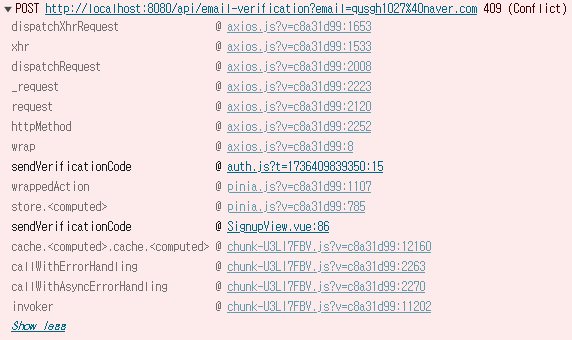
이미 가입된 이메일을 입력하고 인증번호 전송 버튼을 클릭하는 경우 409에러가 발생하면 되는데

에러 로그는 잘 뜨는데 클라이언트에서 중복 에러에 대한 알림이 안뜬다.
클라이언트측 코드
/**
 * 이메일 인증번호 전송
 */
const sendVerificationCode = function (email) {
    return axios.post(`${REST_API}`, null,
        { params: { email }
        })
        .then((response) => {
            // alert('인증번호가 전송되었습니다.')
        })
        .catch((error) => {
            console.log('status: ' + error.response.status)
            console.log('data : ' +  error.response.data)
            switch (error.response.status) {
                case 409:
                    alert(error.response.data)
                    break;
                default:
                    alert('인증번호 전송 실패')
            }
        })
}
"이미 사용 중인 이메일입니다." 라는 알림이 안뜨다가 이제는 또 잘뜬다.
코드를 조금 바꾸긴 했지만 그것보다는 다시 시작해서 그런 것 같음
/**
 * 이메일 인증번호 전송
 */
const sendVerificationCode = function (email) {
    return axios.post(`${REST_API}`, null,
        { params: { email }
        })
        .then((response) => {
            // alert('인증번호가 전송되었습니다.')
        })
        .catch((error) => {
            console.log('error : ' + error)
            console.log('response : ' + error.response)
            console.log('status: ' + error.response.status)
            console.log('data : ' +  error.response.data)
            switch (error.response.status) {
                case 409:
                    alert(error.response.data.message)
                    break;
                default:
                    alert('인증번호 전송 실패')
            }
        })
}
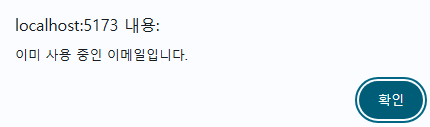

이제는 로직이 문제
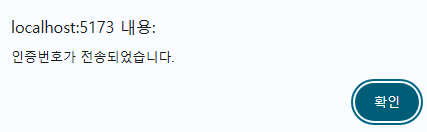
"인증번호가 전송되었습니다." 라는 알림이랑 "이미 사용 중인 이메일입니다." 라는 알림 두 개가 모두 뜨는 건 이상하니까 한 개만 뜨도록 해야한다.
이메일로 인증번호를 전송하는데 5초 가까이 걸리다보니 사용자 경험을 개선하기 위해서 인증번호 전송 버튼을 클릭하자마자
"인증번호가 전송되었습니다." 알림이 뜨도록 했는데 중복된 이메일인 경우 "이미 사용 중인 이메일입니다." 알림이 중복으로 발생하게 된다.
다시 해결 방법을 찾아봐야겠다.
[리팩토링] 이메일 인증번호 전송 사용자 경험 개선 - 1
문제이메일 인증번호 전송 과정에서 좋지 않은 사용자 경험을 제공했다.인증번호 전송 버튼을 클릭하면 입력한 이메일로 인증번호를 전송하게 되는데 인증번호를 성공적으로 전송한 경우"인증
my-study-storage.tistory.com
'고민거리' 카테고리의 다른 글
| [최적화] 게시글 (0) | 2025.04.05 |
|---|---|
| [고민거리] 작성자 : 댓글 연관 관계 매핑 (0) | 2025.03.06 |
| [리팩토링] 이메일 인증번호 전송 사용자 경험 개선 - 2 (0) | 2025.01.10 |
| [리팩토링] 이메일 인증번호 전송 사용자 경험 개선 - 1 (0) | 2025.01.10 |
| 로직의 위치 (0) | 2025.01.06 |